SMS Opt-In
OpenTurn ("OpenTurn Job & Schedule Alerts") only sends text messages to a user after they've explicitly opted in. This page shows exactly how and where that consent is collected inside the app.
Where consent is collected
Every place in the OpenTurn app where a phone number can be entered — a cleaner's own profile, and the optional step shown right after accepting a team invite — shows the same unchecked opt-in checkbox below it. The checkbox is never pre-checked, and checking it is never required to save a phone number or use the app.
What it looks like
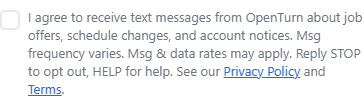
Real screenshot of the checkbox as rendered in the OpenTurn app (components/smsOptInCheckbox.tsx on (cleaner)/profile.tsx).
How it works
- A user enters or already has a phone number on file.
- They explicitly check the box above — this is a real, separate action, never bundled into account creation.
- OpenTurn records that the user opted in, when, and from where (e.g. their profile).
- OpenTurn sends a one-time confirmation text: "OpenTurn: You're subscribed to job & schedule alerts. Msg frequency varies. Msg&data rates may apply. Reply HELP for help, STOP to opt out."
- From then on, OpenTurn sends only the message types described in the checkbox text — job offers, schedule changes, and account notices — each starting with "OpenTurn:" so the sender is always clear.
A user can opt out at any time by replying STOP to any message, or by unchecking the same box in their profile. See our Terms for the full SMS program details, including message frequency and help/opt-out instructions.
Contact
Questions about this program? Email us at support@openturn.co.